
Putting the On/Off button back on Windows Vista’s Log On screen
Windows Vista’s log-on screen, also known as the Welcome screen, lets you log onto your user account and begin working. Shown below, the log-on screen normally shows the red On/Off button in the bottom right corner, and the blue Accessibility options icon on the bottom left corner.
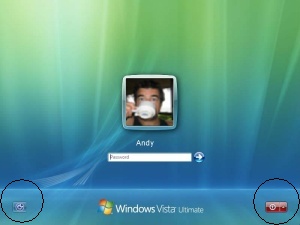 Occasionally, though, you’ll notice the red On/Off button has disappeared from the log-on screen, leaving you no way to turn off your PC. What gives?
This happens when Vista jumps to the log-on screen on its own, usually because you haven’t touched the mouse pointer for a few minutes. Assuming you’ve wandered off, the security-conscious Vista keeps your Desktop private by returning to the log-on screen. And, since you haven’t officially logged off, Vista hides the On/Off switch. That keeps you from trying to turn off your PC when you still have open programs or files.
The red On/Off button only appears on the log-on screen when all the account holders have closed their work and logged off the PC.
So, to see the On/Off switch again, log back onto the PC, typing your password, if necessary. Then choose Log Off from the Start menu, shown below. Or, simply choose Shut Down, as that’s what you probably wanted to do in the first place.
Posted: August 24th, 2009 under Windows Vista.
Tags: log on/off