
Why do the names of my music files keep changing?
 Q: I keep my song files in a single folder, listed in alphabetical order. I play them with Media Player 11, which came with Windows 7.
Some music files have the same title, but performed by different artists. To avoid duplicate file names, I added the name of the artist or group in parentheses, like In the Mood (Glen Miller) and In the Mood (Andrews Sisters) so I can tell the songs apart.
But the next day, the file names reverted to their old names.
How can I stop this from happening?
A: Media Player is the culprit here, and here’s why: Whenever you run Media Player, it automatically lists all of your songs in its Library, which lists each song’s title and artist name. Then, Media Player begins fiddling with your files, grabbing information from the Internet to make sure the songs’ include the right artist names and titles.
In your case, however, Media Player’s housekeeping is actually destroying all the time you spent arranging and naming your songs: One of Media Player’s tasks can include renaming your songs’ file names.
To fix the problem, you need to dive into Media Player’s settings by following these steps:
- Open Media Player, either by clicking its icon on your taskbar, or clicking Start, choosing All Programs, and double-clicking Windows Media Player.
- Click the Organize button and choose Options from the drop-down menu.
- Click the Options window’s Library tab.
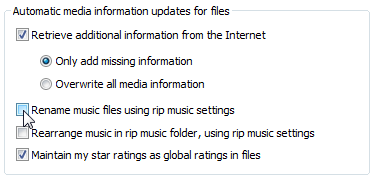
- Click to remove the checkmark by “Rename music files using rip music settings.”
- Click the OK button.
The next time you play your songs in Media Player, the program won’t rename them.
Posted: February 23rd, 2010 under Windows 7.
Tags: Media Player 11, music files, Rename music files using rip music settings, stop media player from renaming files
Comments
Comment from Andy Rathbone
Time October 31, 2011 at 10:08 am
@Mark
Are you also using Media Player 11? And did the solution I’ve described on this page fix the problem?
Comment from chris
Time February 1, 2012 at 4:53 am
Hello Andy – I’m very frustrated by MP11. I have a load of single tracks, downloaded from various sources. Viewing by album becomes largely impossible, and I’m not really concerned which album many of them came from anyway, so I renamed the albums as “single trax:rock” or “single trax:soul” etc. and grouped similar items together. I have other albums too.
Then later, I decided to rename even those just to “Rock”, or “Soul” cos I had too many albums under S 🙂 … MP11 keeps on converting back SOME of the tracks to the earlier album name (single trax…). It’s not as if it is even reading such a name off the net cos it’s a name I made up myself! So I end up with 2 separate collections of Rock and 2 of Soul, etc.
So far as I can tell, it is entirely random how it concludes which individual tracks end up reconverted to the old album name. I get over this by drag and drop at album level but it seems to redo this again and again, almost every time I open up MP11. Any thoughts?? Thanks in advance…
Comment from Andrew
Time October 8, 2012 at 4:08 pm
I have the same problem (running WMP 11 on XPx64) as the original questioner, despite having no checkmark against “Rename music files using rip music settings.”
Every other option which could conceivably justify retrieving info or renaming files is also turned off.
It does not rename all files it has previously ripped, but a random subset (sigh!)
Comment from tosea
Time July 25, 2013 at 11:46 am
Thanks so much for this info. I thought I’d gone crazy! This has cost me so much time…NO PROGRAM SHOULD EVER BE ALLOWED TO CHANGE FILE NAMES!!!!! I’m SO angry!!!
Comment from Rychedelic
Time June 17, 2014 at 2:12 pm
Thanks for the fix Andy, I was going insane trying reorganize this mess that is WMP labeling but it seems to be working now…I will check it again but for now I am grateful. I can’t believe some numbskull created a program like WMP that doesn’t know how to sort a music library properly…who the hell alphabetizes the Rolling Stones under THE or artists by first name?? I’m guessing it’s some young whipper-snapper who never visited a record store, ughh!! 😛
Comment from Craig
Time December 25, 2014 at 10:49 am
I’m having the same problem with one CD where the manufacturer mixed all the song titles with the wrong songs. I’m trying to rename them to the proper name but after a few minutes the names go back. I tried doing the fix and the box was never checked. Now what?
Comment from Andy Rathbone
Time December 29, 2014 at 2:07 pm
> Craig: You need to rename both the files and the tags inside the files. Also, Media Player isn’t the only player that renames songs; many third-party music players do the same thing.
Comment from Yvette
Time September 5, 2015 at 4:39 pm
This is how I got it to keep the names I chose. First, uncheck the rename files box and stuff previously mentioned by other comments. Then, I made myself a folder called “Remove Tags.” I moved all the songs, I wanted to edit, to that folder. Do a couple of mp3s at a time; so you can see if it’s going to work for you. Delete from Library Only (those same songs). In options menu, clear the cache and clear history. Close Media Player. I used the program id3kill to remove all the tags. When you go into the “Remove Tags” folder, you will notice that the Artist and other info is gone. Rename the files like you want. Next, search for media files with Windows Media Player by choosing look in “Remove Tags” folder. If it worked for you, then clear the history and cache again. Close Media Player. Now you can put your files back in their original folders. Rescan all your music into WMP when you are done. FYI. I’m using WMP 10.
Comment from Les
Time December 14, 2023 at 11:31 pm
I also am encountering issues with Music Files being either truncated and or renamed I.E. to something like 01 Track1.MP3 (Or M4a, Wav, and WMA). I have never had the box checked to use the file name from the ripping operation. In the OPTIONS pop up under Rip Music then in the section labeled Rip Music To This Location there are two options. One to set where the files are ripped to [Change button] and one [File Name]. Under the File Name selection there are a series of criteria check boxes you may choose from (Select or not). One of these is Track Number which is exactly what is happening in my case. There is one check box that is mandatory to be checked in MP 12 [SONG TITLE] again this is that which is being changed in my case. So if the Album associated with this file is not found on the web the song titles revert to track numbers with no additional information entered into the songs details (Artist, Corresponder, Song title, etc…). I have de-selected the Track Number Box, and will see if this has any affect. Unfortunately I suspect that the Song Title still is going to over ride any changes I make to the song titles directly within file explorer (Directly to the files on the hard drive). Any on else has more on this please post. And thank you all for the informative posts.
Comment from Mark
Time October 31, 2011 at 7:35 am
I have actually done this and verified it a few times. My files keep getting renamed back to their original ripped file name and sometimes they even get moved to a different folder.