
Internet Explorer won’t let me send pages or links by e-mail!
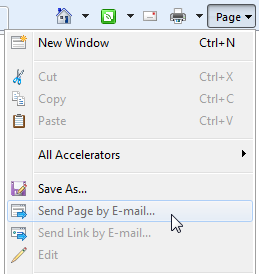 Q: On Internet Explorer 8’s Page menu, the “Send Page by E-mail” and “Send Link by E-mail” options are both “grayed out,” and I can’t choose them. I normally log onto a Web site to send and receive my e-mail.
A: Windows 7 lacks an e-mail program, which causes more than a few problems. Microsoft expects people to download and install its free Windows Live Maile-mail program. Or, you can download competing free e-mail programs like Thunderbird, and install them to handle your e-mail chores.
But if you’re using a Web-based e-mail service, like the ones provided by many Internet Service Providers like AT&T, you’re left in the lurch: Internet Explorer doesn’t consider them to be e-mail programs, so it won’t let you send pages and links using its menu.
So, since those menu options are grayed out, you’re stuck with these convoluted steps:
- Highlight the link you want to send from within Internet Explorer’s Address bar.
- Right-click the highlighted link and choose Copy.
- Log on to your e-mail service and create a new e-mail.
- Right-click inside your blank e-mail and choose Paste.
The link will appear in your e-mail window, ready for you to send to a friend.
The grayed-out links begin working once you install an e-mail program like Windows Live Mail, but you still might have to make a few extra tweaks.
Posted: March 1st, 2010 under Email, Free software, Internet.
Tags: e-mail, grayed out, greyed out, Internet Explorer 8, Send Link by E-mail, Send Page by E-mail, web-based e-mail
Comments
Comment from John B
Time October 17, 2013 at 6:58 am
“Comment from Dajonda
Time August 6, 2013 at 8:22 am
The “send link” and “send page” are no longer whited out but the link sent is not underlined so it does not function as a link for the recipient. Also to send the page I first have to “allow” it to open outside of “protected mode”. Is there any way to make “send link” and “send page” work better? (Using IE 10)
Windows 7 is great BTW.”
THIS is precisely the problem I am having-right now in Oct’ 2013.
Do you know whether this problem has been sorted yet?
And what the solution might be?
I UTTERLY LOATHE BOTH W7 AND ALSO ‘LIVE MAIL’ Vista with Win Mail worked perfectly for me. I also I hate Ie 9, preferring IE 8. And while I am at the ‘hating’ business, I also hate this filthy ‘Samsung’ laptop where I can’t tell whether caps are on or not, and which also has no manual ‘off’ switch for its broadband tx/rx.
Comment from Andy Rathbone
Time October 17, 2013 at 12:22 pm
John B: I’m afraid that I don’t know of a way to solve that problem.
Comment from Dajonda
Time August 6, 2013 at 8:22 am
The “send link” and “send page” are no longer whited out but the link sent is not underlined so it does not function as a link for the recipient. Also to send the page I first have to “allow” it to open outside of “protected mode”. Is there any way to make “send link” and “send page” work better? (Using IE 10)
Windows 7 is great BTW.